
Who this suits: Businesses buying switches for cameras, Wi-Fi access points or other powered network devices.
Direct answer: enough ports is only the first check
A PoE switch must provide the correct power standard to each device, sufficient total power for the connected load and suitable data connectivity. An eight-port switch with eight PoE labels does not necessarily deliver every port's maximum simultaneously. Check the exact hardware revision, power supply, operating conditions and manufacturer specifications. Treat the total PoE budget and per-port capability as separate limits.
Power over Ethernet, or PoE, can simplify installation by combining power and data over suitable Ethernet cabling. It does not remove the need for cable testing, electrical safety, appropriate mounting or a considered network design. This guide explains a planning method; unusual distances, outdoor links and high-power devices deserve competent site-specific advice.
Identify the standards on both sides
Record the camera or access point's required standard and power specification, then match it to the supplying switch or injector. IEEE 802.3af, 802.3at and 802.3bt describe different supported power arrangements. Manufacturer guidance distinguishes power available at the supplying port from the usable amount at the device after the intended cable path. Do not compare those two figures as though they were the same measurement.
Check whether a device uses standards-based PoE or a proprietary passive supply. A familiar connector is not proof of compatibility, and an unsuitable supply can cause problems or damage. Follow the exact manufacturer's requirements. If the quote substitutes an injector, require its model and specification rather than accepting a generic statement that power is included.
Make a device load schedule
For each powered device, record model, quantity, required PoE class or standard, relevant maximum load, cable path and whether features change consumption. Night illuminators, heaters, fans, PTZ movement and attached accessories can matter. A daytime average can be useful for energy or battery planning while still being unsuitable for checking maximum supply capability.
Ask how the switch allocates power. Some equipment reserves power by class or configuration rather than simply summing the live watts shown at one moment. Confirm the vendor's supported budgeting method. Do not reduce an allowance solely because the dashboard happens to show a small load during commissioning with lights and motors inactive.
Worked budget with explicit assumptions
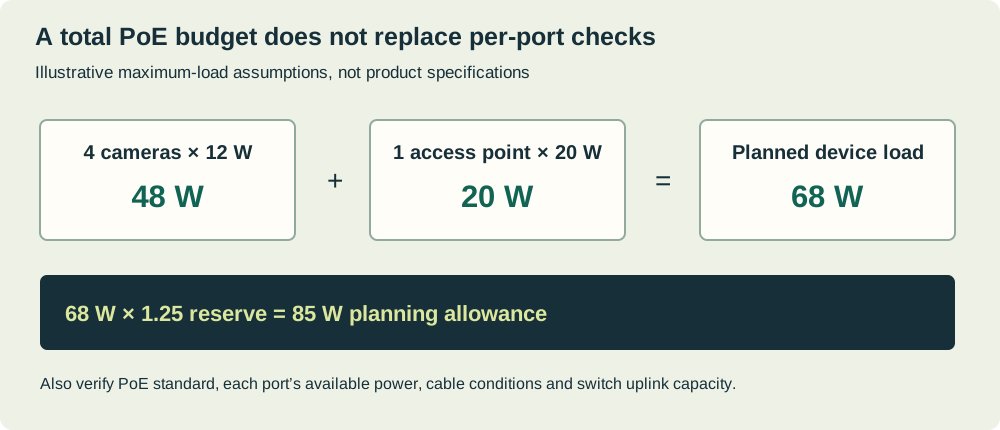
Assume six fixed cameras each require an allowance of 9 W at the chosen budgeting basis, and two access points each require 18 W. The sum is 6 × 9 plus 2 × 18, or 90 W. If you choose an illustrative planning margin of 20%, the target becomes 108 W. That margin is an explicit design assumption, not a universal standard or substitute for the manufacturer's allocation rules.
A switch with a 120 W total budget may appear suitable if every port also supports its assigned device and the quoted budget applies under the installation conditions. A 65 W budget is insufficient for the assumed sum even though it may have eight powered ports. Recalculate when adding a PTZ or changing an access-point model rather than assuming a spare socket means spare capacity.
Read a real datasheet carefully
TP-Link's Australian page for the TL-SG1008MP V2 separately lists eight PoE+ ports, a total power budget and a per-port limit. Other revisions and related models can have different budgets. Use the exact version in the quote, confirm current local availability with the supplier and retain the datasheet supporting the decision.
The purpose of a model example is to show the separate categories you must verify, not to select a switch by brand. Also read environmental limits, power-source assumptions, fan behaviour and mounting requirements. A specification stated for one power supply or revision should not be copied onto a similar-looking unit found at a lower price.
Check uplinks and topology
Power capacity does not prove data capacity. Count camera streams, access-point traffic, uplinks and any links between switches. A camera port may carry modest traffic while an uplink aggregates many devices. Confirm the actual link speeds and intended traffic paths. Do not assume every switch has dedicated uplink ports beyond the advertised total port count.
Plan separation and management where required. A managed switch can support useful features, but only if someone configures and maintains them. A second Wi-Fi name or a port label is not proof of enforced isolation. Keep the diagram and configuration under business control. Feature-rich hardware without a support owner can create unnecessary operational complexity.
Plan failure, restart and backup power
Ask what the switch does when the budget is exceeded: whether ports are denied, prioritised or disconnected, and how an alert is produced. A camera that restarts only when all infrared lights turn on can be a power-budget symptom, but faults need diagnosis rather than assumption. Check cabling, supply condition and device requirements as well.
If backup power is required, size for the switch's own consumption plus connected devices and other critical network equipment. PoE budget is not the whole wall-plug load or a UPS runtime figure. Have a suitable professional assess load, runtime and safety. Test a controlled restart and recovery with the normal device set, including relevant high-load operating modes.
Keep the budget auditable after expansion
Attach the load schedule to the network diagram and update it whenever a device is replaced or moved. Record which ports are intentionally reserved and why. A future installer should be able to see that a spare port is needed for planned growth or that a high-power device cannot be moved casually to another switch.
During commissioning, retain the quoted specifications and relevant observed readings, but label them correctly. A dashboard measurement is evidence of that operating state, while the design allowance addresses supported requirements and credible load conditions. Keeping both prevents a later maintenance visit from removing necessary margin simply because the system appeared lightly loaded at midday.
Frequently asked questions
Can I add the numbers from the switch's live dashboard? They can help diagnose and monitor, but a single reading may miss peaks or power reservation. Use the exact vendor budgeting method and device requirements for design, then compare observed behaviour as supporting evidence.
Will a bigger power budget make cameras use more power? A compatible standards-based supply provides capacity; it does not mean each device consumes the full available budget. Still, verify compatibility and avoid assuming passive products behave the same way. Buying substantial unused capacity may be sensible for documented growth, but it is not automatically a reliability improvement.
Turn the calculation into an order
Give the supplier a device schedule, power assumptions, port and uplink needs, environment and planned additions. Request the exact model and revision, supported supply, installation scope and handover. Mark unknown device loads as unresolved rather than zero. Include a commissioning check that all intended devices operate together under relevant conditions.
Use the planning questionnaire for the camera brief and the network requirements estimator for concurrent activities. Review warehouse planning when equipment is spread across a larger site. You can request equipment options against the schedule. BoxFreeIT shares ownership with Security Wholesalers; a related recommendation should still be assessed against verified power and network requirements, not a port-count headline.
Sources and review notes
Official references used for this guide. Product features and terms can change. Examples are illustrative unless explicitly described otherwise.