
Who this suits: Businesses worried that more cameras will overload the internet or mobile data plan.
Direct answer: local recording and internet traffic are different
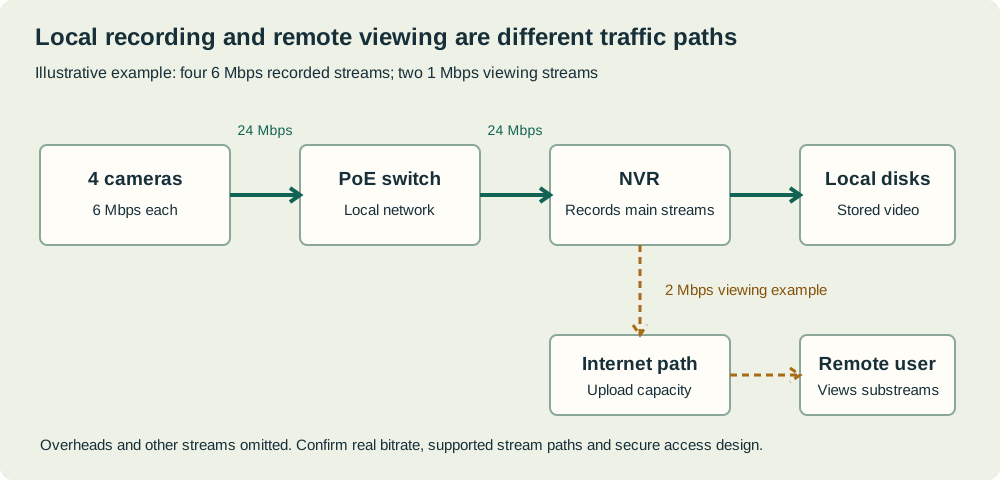
Cameras recording to a local NVR normally send their video across the local network, not automatically through the internet. Remote viewing, cloud recording, alerts and off-site playback can use the site's internet connection. The required upload depends on which streams leave the premises, at what bitrate and for how long. Camera count alone cannot determine the internet plan or mobile data allowance.
Draw the actual traffic paths before calculating. A ten-camera local system viewed occasionally by one owner is different from ten cameras continuously uploading to cloud storage. A remote office watching several sites creates a different receiving load again. Product settings and topology determine the result, so confirm the proposed arrangement rather than relying on a generic per-camera figure.
Use the right units
Mbps means megabits per second, a rate. GB means gigabytes, a quantity of data. In decimal units, one byte contains eight bits, so a steady 1 Mbps stream carries about 0.45 GB per hour before protocol and other overhead. Multiply the rate by viewing hours to estimate data use.
Do not confuse a camera's maximum bitrate setting with its measured average. Variable bitrate can change with scene activity and conditions. For capacity and service-quality planning, account for simultaneous demand and peaks; for a monthly allowance, use realistic average rates and hours with explicit margin. A calculation based on one quiet daytime sample may understate a busy or noisy night scene.
Separate main streams and substreams
Many systems offer a high-quality stream for recording and a smaller stream for efficient multi-camera viewing. Exact support, settings and switching behaviour depend on the camera, recorder and client. A remote grid may use substreams and switch to a larger stream when one view is opened. Verify that behaviour rather than assuming every app is identical.
A lower-quality remote preview can be sensible if the original recording remains available at the required quality. Do not lower the stored evidence stream merely to make a phone grid load faster without checking the consequences. Test playback and export separately from live view, since requesting original footage may create a much larger upload than the normal preview.
Worked example: occasional remote viewing
Assume an owner views four substreams at an average 0.5 Mbps each for one hour daily. The combined video rate is 2 Mbps, and decimal video use is approximately 0.9 GB per day, or 27 GB over thirty days. These are illustrative settings and usage, not claims about a particular camera app.
Now assume the owner opens one original-quality 6 Mbps view for an additional fifteen minutes each day. That adds about 0.675 GB daily, or 20.25 GB monthly. Total illustrative video use becomes 47.25 GB before overhead, alerts, updates and other activity. Small changes in viewing habit can materially change a mobile-data budget. Use measured service reports after commissioning to validate the estimate.
Worked example: continuous cloud upload
Assume six cameras continuously send an average 4 Mbps each to an off-site destination. The combined rate is 24 Mbps. At 0.45 GB per Mbps-hour, the decimal video volume is about 259.2 GB per day and 7,776 GB over thirty days. That is approximately 7.78 TB before other traffic and overhead.
Those figures are arithmetic assumptions, not recommended settings or a current cloud-plan price. Event-only upload or a hybrid design may reduce volume, but the saving depends on actual events and the product's behaviour. Do not apply an unexplained fixed percentage. Confirm whether the service uploads full video, selected clips, thumbnails, metadata or something else, and what happens during disconnection.
Check upload capacity and competing work
The premises connection must send remote video outward, so upload capacity is often the relevant constraint at the camera site. The viewer also needs adequate receiving capacity. Video meetings, file transfers and cloud backups may compete at the same time. A fast download headline does not establish sufficient upload or dependable latency.
Use nbn's business guidance as a prompt to assess simultaneous activities, then validate the actual service at the address. Do not assume a plan's advertised maximum is continuously available to the application. If remote viewing becomes unreliable only during backups, investigate scheduling, prioritisation and capacity with the provider or IT support person rather than automatically reducing every camera's recording quality.
Multiple viewers and system limits
Two viewers can create additional traffic or processing, depending on how the platform serves streams. A recorder, relay or other service may distribute them differently from clients connecting directly to each camera. Axis's developer guidance explains that camera resources and stream requests can interact; that behaviour is an example to investigate, not a universal rule for every brand.
Ask the supplier to demonstrate the actual simultaneous users, views and playback tasks required. Check the recorder's outgoing bandwidth and client limits as well as internet capacity. A network speed upgrade cannot solve a recorder decoding or stream-resource limit. Keep account permissions appropriate; bandwidth planning is not a reason to share one unrestricted owner login among all viewers.
Plan outages and mobile limits
For a remote solar or 4G location, assess reception, data allowance, excess charges and local recording independently. Ask exactly what records while the link is down and whether missed video or event metadata is transferred later. Local storage does not automatically imply complete automatic backfill. Test the exact model, firmware and management service.
Decide which traffic is essential when bandwidth is constrained. A low-rate preview, selected alerts and authorised retrieval may be more practical than continuous upload, provided the recording purpose is still met. Include firmware updates and maintenance access in the allowance. A plan that reaches its limit unexpectedly can affect much more than casual live viewing.
Frequently asked questions
Will adding two cameras slow the office internet? Not necessarily if they record locally and do not add substantial off-site traffic. They still add local network and power demand. Draw the paths and check the actual remote or cloud functions before changing the internet plan.
Can I calculate data from resolution alone? No. Use bitrate and duration, with scene and settings assumptions stated. Two cameras at the same resolution can use different data. Confirm configured and measured rates and distinguish normal remote preview from original-quality playback or export.
Measure, then refine the plan
Record each off-site use case, streams, assumed bitrate, hours, viewers and destination. Calculate a base and busy case, then check actual network or provider reports after deployment. Keep local recording requirements separate from remote convenience. Include secure access, service limitations and responsibility for diagnosing congestion in the handover.
Use the network estimator for concurrent office activities and the storage estimator for recorded volume. See multi-site planning or request equipment options with your viewing pattern. BoxFreeIT and Security Wholesalers share ownership. Any related suggestion should be assessed against measured traffic and model-specific behaviour, rather than a blanket promise that a given internet speed supports a certain number of cameras.
Sources and review notes
Official references used for this guide. Product features and terms can change. Examples are illustrative unless explicitly described otherwise.